

Yale School of Art Web Redesign
Yale School of Art Web Redesign
1 month (2025)
1 month (2025)
Yale School of Art
Yale School of Art
Website
Website
Conceptual redesign for an internal UI/UX Design Challenge at Akar Inti Teknologi (2025) and recognized by the design lead as the standout project submission.
A fresh new look for an insurance mobile app, owned by a major bank with two main goals: to expand market presence and enhance customer retention.
Disclaimer: This is a conceptual redesign created for the internal UI/UX Design challenge at Akar Inti Teknologi. This project is not affiliated with the Yale school of art.
Disclaimer: This is a conceptual redesign created for the internal UI/UX Design challenge at Akar Inti Teknologi. This project is not affiliated with the Yale school of art.
Overview
Overview
The Yale SoA website is a wiki where anyone (current student, staffs, alumnus of Yale) can manage the website by adding new data or changing the background image of the site, and is notoriously known for having an outdated look, despite being under a highly prestigious institution.
My goal was to balance the usability of the website to internal and external users while still keeping the identity of the website and the school itself.
The Yale SoA website is a wiki where anyone (current student, staffs, alumnus of Yale) can manage the website by adding new data or changing the background image of the site, and is notoriously known for having an outdated look, despite being under a highly prestigious institution.
My goal was to balance the usability of the website to internal and external users while still keeping the identity of the website and the school itself.

Yale School of Art's web current design
Research
Research
With limited access, I keep my research option minimal, yet can still represent one of the main user of the site (first-time visitor)
With limited access, I keep my research option minimal, yet can still represent one of the main user of the site (first-time visitor)
Personal Observation
Personal Observation
Based on my observation of the current website, I found some problems that could be improved:
Based on my observation of the current website, I found some problems that could be improved:
The site is chaotic and every element is fighting for user’s attention
No clear hierarchy/confusing navigation
The repeating background photo (or gif) is visually overwhelming
Poor use of white space and layout
The site feels outdated, which undermines the credibility of such prestigious institution
The site is chaotic and every element is fighting for user’s attention
No clear hierarchy/confusing navigation
The repeating background photo (or gif) is visually overwhelming
Poor use of white space and layout
The site feels outdated, which undermines the credibility of such prestigious institution
Peer reviews
Peer reviews
I gathered informal feedbacks from five users about their first impressions of the website, they said:
I gathered informal feedbacks from five users about their first impressions of the website, they said:
‘It’s too much to look at. It’s chaotic and very messy’
‘It’s too artsy to the point that I’m not sure what I’m looking at. Definitely not spending a second longer there’
‘The website looks a bit questionable. It is Yale, right?’
‘It’s too much to look at. It’s chaotic and very messy’
‘It’s too artsy to the point that I’m not sure what I’m looking at. Definitely not spending a second longer there’
‘The website looks a bit questionable. It is Yale, right?’
Reddit & other websites
Reddit & other websites
I did a little search around with the keyword ‘Yale website’ and found several Reddit threads discussing how visually unpleasant the site is. I also found Quora thread, and several Medium articles suggesting their own spin of redesign. This confirms that it’s widely accepted that the website (in terms of UI/UX) is not good.
I did a little search around with the keyword ‘Yale website’ and found several Reddit threads discussing how visually unpleasant the site is. I also found Quora thread, and several Medium articles suggesting their own spin of redesign. This confirms that it’s widely accepted that the website (in terms of UI/UX) is not good.
Recontextualizing the Problem
Recontextualizing the Problem

Website information
From my research, the clear solution was to do a UI makeover, but that was still too vague and broad to execute.
From my research, the clear solution was to do a UI makeover, but that was still too vague and broad to execute.
This website is a wiki, meaning anyone with access can edit the site to their liking, including changing the background image (static image or a gif). While this can be a way to make the site as a living community, it can also lead to chaos (readability and usability). Thus, the chaos is not a design flow but part of the feature.
This website is a wiki, meaning anyone with access can edit the site to their liking, including changing the background image (static image or a gif). While this can be a way to make the site as a living community, it can also lead to chaos (readability and usability). Thus, the chaos is not a design flow but part of the feature.
The challenge for the redesign now shifts, it’s just not about the visual. How do I preserve the wiki’s community nature while making it usable for the public?
The challenge for the redesign now shifts, it’s just not about the visual. How do I preserve the wiki’s community nature while making it usable for the public?
Competitive Analysis
Competitive Analysis

Pratt's Institute - one of the best art school in the United States
Pattern(s) identified: big fonts, simplistic menu, and big pictures are used in the website.
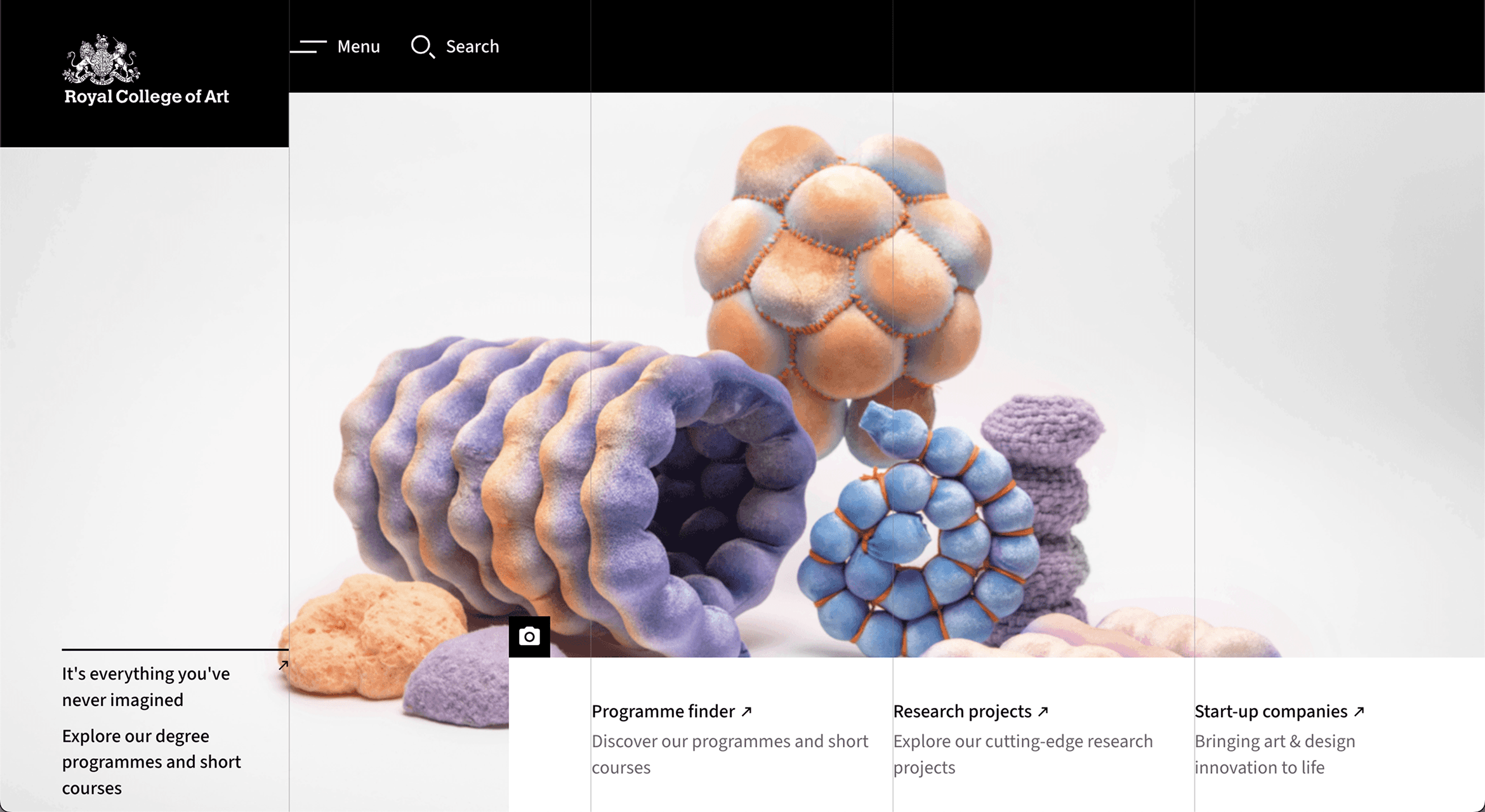
Royal College of Art, London - known as the best art school in the world
Pattern(s) identified: simplistic menu, big pictures, and non conventional ‘hero’ section
Pratt's Institute - one of the best art school in the United States
Pattern(s) identified: big fonts, simplistic menu, and big pictures are used in the website.
Royal College of Art, London - known as the best art school in the world
Pattern(s) identified: simplistic menu, big pictures, and non conventional ‘hero’ section
Patterns that can be applied to the redesign:
Using big/bold font size to introduce themselves: This is a simple and effective way to introduce presence without clutter
Simple navigation: To keep the user’s focus to the content
Big and impactful visual: Using the right picture as the main banner can quickly set the vibe of the site; let the picture does all the talking.
Getting Inspirations
Getting Inspirations
I drew inspiration from various sources, such as:
I drew inspiration from various sources, such as:

Yale SoA school building
Yale SoA school building
To get the environment of the school
To get the environment of the school

Yale SoA's student websites
Yale SoA's student websites
To understand the (visual) taste level of the students
To understand the (visual) taste level of the students

Kitschy-style website
Kitschy-style website
I added this after seeing the artworks of the students and visuals from poster events
I added this after seeing the artworks of the students and visuals from poster events
UI Kit
UI Kit
Typography
Typography
IBM Plex Sans Condensed - Regular
IBM Plex Sans Condensed - Regular
IBM Plex Sans Condensed - Medium
IBM Plex Sans Condensed - Medium
IBM Plex Sans Condensed - Bold
IBM Plex Sans Condensed - Bold
The typeface that mixes in sans, sans condensed and mono create bold and brutalist vibe without overwhelming the user. This typeface also works for text heavy section.
The typeface that mixes in sans, sans condensed and mono create bold and brutalist vibe without overwhelming the user. This typeface also works for text heavy section.
Color Style
Color Style
Simplistic colors were used to embodies the ‘modern’ and ‘brutalist’ feel and look of the redesign. Yellow were used to break the monotonous look.
Simplistic colors were used to embodies the ‘modern’ and ‘brutalist’ feel and look of the redesign. Yellow were used to break the monotonous look.
Iconography
Iconography

Basic icon with strong edges were used to create continuation from the sharp edges elements present in the redesign.
Basic icon with strong edges were used to create continuation from the sharp edges elements present in the redesign.
Final Design
Final Design
Welcome screen
Welcome screen
Quick intro to adjust the viewer’s expectation about this specific website (works mostly as a hub for the internal Yale SoA community but the public can also get information about the school).
Quick intro to adjust the viewer’s expectation about this specific website (works mostly as a hub for the internal Yale SoA community but the public can also get information about the school).
Playful/interactive utility
Playful/interactive utility
The circle button is a toggle to switch into light/dark mode. A simple but fun way to interact with the website, making the website memorable to the user and respect the school’s creative spirit
The circle button is a toggle to switch into light/dark mode. A simple but fun way to interact with the website, making the website memorable to the user and respect the school’s creative spirit
Strategic use of the custom background
Strategic use of the custom background
Custom background image is now centered and non-repeating, preventing visual overwhelm when scrolling through the site.
Custom background image is now centered and non-repeating, preventing visual overwhelm when scrolling through the site.
Students work gallery
Students work gallery
Added a dedicated section to showcase the student work/projects. Displaying them like a gallery art work to reinforces the creative aspect and adds a human element to the site
Added a dedicated section to showcase the student work/projects. Displaying them like a gallery art work to reinforces the creative aspect and adds a human element to the site
Bulletin board as centerpiece
Bulletin board as centerpiece
Sticky note with real looking bulletin board is used to capture the school’s creative and collaborative spirit without sacrificing readability. Longer post are scrollable within each note.
Sticky note with real looking bulletin board is used to capture the school’s creative and collaborative spirit without sacrificing readability. Longer post are scrollable within each note.
Marquee newsletter sign-up
Marquee newsletter sign-up
Fun, eye-catching, and simple marquee text with bright orange background to get the user’s attention to the Call To Action (Subscribe to Newsletter).
Fun, eye-catching, and simple marquee text with bright orange background to get the user’s attention to the Call To Action (Subscribe to Newsletter).
Reflection
Reflection
My approach to this redesign was shaped by what I learned from both the Retrospective and AtlasInsurance
The only brief for this redesign was ‘make this UI better’. It’s very vague and subjective (implying it’s only a UI problem), but I didn’t take this statement at face value. Instead, I:
Reframed the statement (from Retrospective): By observing the website thoroughly, I identified the real problem: the repeating background image is one of the main contributor to that statement. And as previously mentioned, this is part of the feature; it’s a UX problem
Intentional competitive analysis (from AtlasInsurance): I carefully choose which competitors to observe, specifically those sharing the same prestige as Yale’s and shaped my findings to fit into what the client (Yale) needs.
The result was a redesign that scored 100% preference in informal testing with 5 participants (mix of designers and general users) and solved a problem that most designers would have missed: the chaos wasn’t a design flaw, it was a feature.
Back to top